Product Catalog Synchronization
Use Case Overview
| Key Model(s) and Fields | Supported Applications |
|---|---|
Products sku description images productType createdTimestamp | Shopify, Adobe Commerce (formerly Magento), BigCommerce, WooCommerce, Salesforce Commerce Cloud, SquareSpace, eBay |
This is a bi-directional integration. In this example, you can GET, POST, PUT/PATCH and DELETE target resources to to ensure that your application is presenting accurate product information to your merchants’ customers.
How to build this use case with Alloy's Unified API
1. Create a Connection
To get started, you'll need to first implement Alloy's Unified API and create a connection. A connection represents each time an end user links an app to Alloy's Unified API. See Creating a Connection in our Unified API Quickstart.
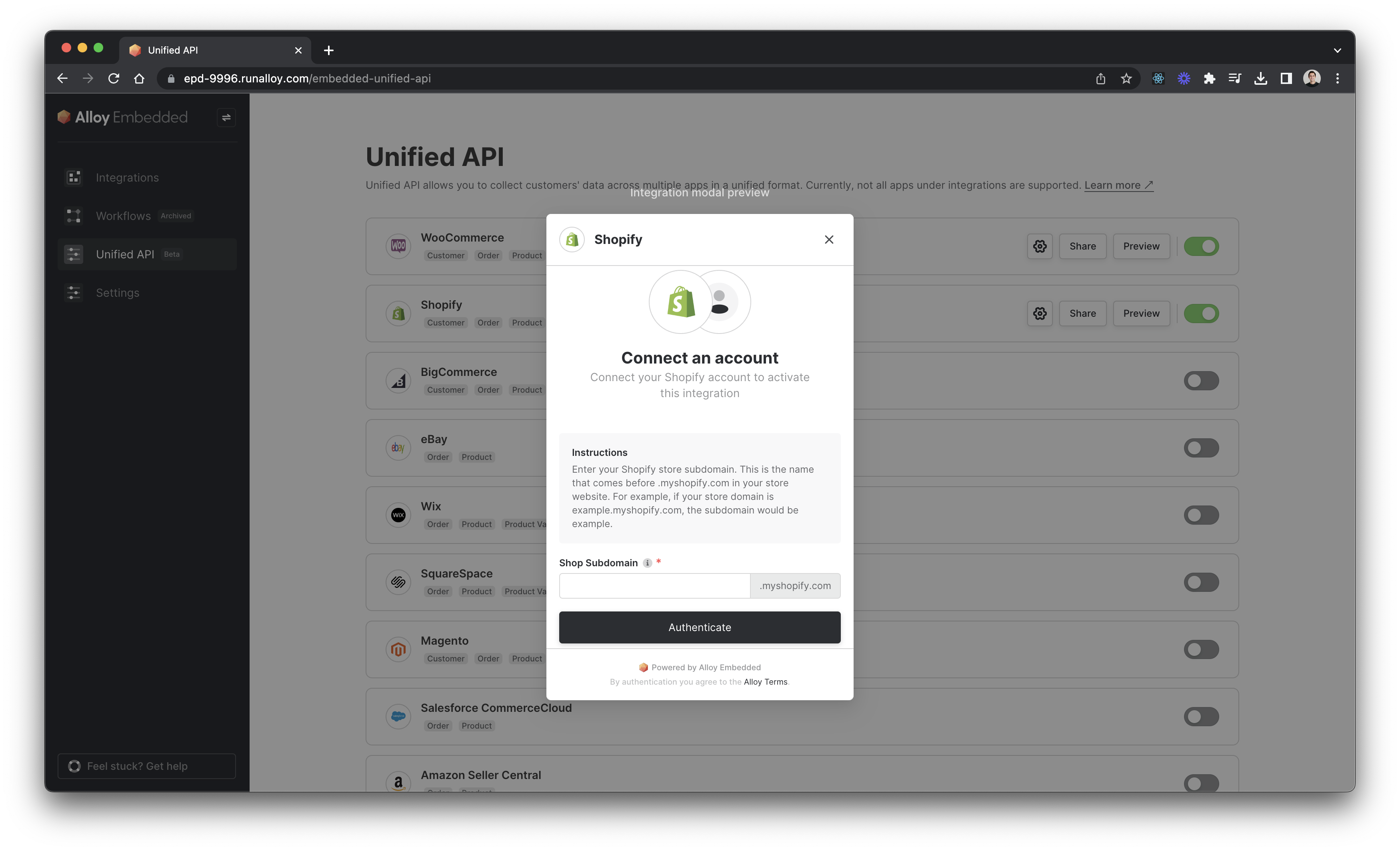
If you’ve already done this, read on!
2. Sync all products from a user’s commerce platform to your application
Alloy’s [GET List Products] endpoint allows you to retrieve all historical products from a user’s commerce store in a standardized format. In Alloy’s Unified API, the Products object includes properties like sku, description, images, and more.
Your request should be structured like this:
curl --request GET \
     --url 'https://embedded.runalloy.com/2023-12/one/commerce/products?connectionId=k69kp75tswixu03v6yxfx4x6' \
     --header 'Authorization: bearer hbjO6oNheaB-A5JElqJkX' \
     --header 'accept: application/json'
Your response payload should look something like this:
{
  "products": [
    {
      "remoteId": "1234567890123",
      "createdTimestamp": 1600000000,
      "updatedTimestamp": 1600000000,
      "productType": "Apparel",
      "productName": "Example Shirt",
      "description": "A stylish shirt for all occasions.",
      "images": [],
      "productStatus": "ACTIVE",
      "tags": ["Fashion", "Comfort"],
      "vendor": "Example Vendor",
      "productUrl": "https://example.com/products/example-shirt",
      "id": "00112233-4455-6677-8899-aabbccddeeff",
      "variants": [
        {
          "remoteId": "200100200100",
          "productId": "00112233-4455-6677-8899-aabbccddeeff",
          "createdTimestamp": 1600000000,
          "updatedTimestamp": 1600000000,
          "title": "Medium",
          "price": "25.00",
          "sku": "SHIRT-M",
          "optionValues": [
            {
              "name": "Size",
              "value": "Medium"
            }
          ],
          "inventory": {
            "totalCount": 50
          },
          "weight": [
            {
              "value": 0.5,
              "unit": "kg"
            }
          ],
          "id": "11001100-1122-3344-5566-77889900aabb"
        }
      ]
    },
    {
      "remoteId": "2345678901234",
      "createdTimestamp": 1600100000,
      "updatedTimestamp": 1600100000,
      "productType": "Electronics",
      "productName": "Example Headphones",
      "description": "High-quality wireless headphones.",
      "images": [],
      "productStatus": "ACTIVE",
      "tags": ["Gadgets", "Audio"],
      "vendor": "Tech Solutions",
      "productUrl": "https://example.com/products/example-headphones",
      "id": "11223344-5566-7788-99aa-bbccddeeff00",
      "variants": [
        {
          "remoteId": "300200300200",
          "productId": "11223344-5566-7788-99aa-bbccddeeff00",
          "createdTimestamp": 1600100000,
          "updatedTimestamp": 1600100000,
          "title": "Black",
          "price": "75.00",
          "sku": "HP-BLACK",
          "optionValues": [
            {
              "name": "Color",
              "value": "Black"
            }
          ],
          "inventory": {
            "totalCount": 100
          },
          "weight": [
            {
              "value": 0.3,
              "unit": "kg"
            }
          ],
          "id": "22112233-4455-6677-8899-aabbccddeeff"
        }
      ]
    },
    {
      "remoteId": "3456789012345",
      "createdTimestamp": 1600200000,
      "updatedTimestamp": 1600200000,
      "productType": "Accessory",
      "productName": "Example Watch",
      "description": "Elegant and modern wristwatch.",
      "images": [],
      "productStatus": "ACTIVE",
      "tags": ["Luxury", "Time"],
      "vendor": "Watch World",
      "productUrl": "https://example.com/products/example-watch",
      "id": "22334455-6677-8899-aabb-ccddeeff0011",
      "variants": [
        {
          "remoteId": "400300400300",
          "productId": "22334455-6677-8899-aabb-ccddeeff0011",
          "createdTimestamp": 1600200000,
          "updatedTimestamp": 1600200000,
          "title": "Silver",
          "price": "150.00",
          "sku": "WATCH-SILVER",
          "optionValues": [
            {
              "name": "Color",
              "value": "Silver"
            }
          ],
          "inventory": {
            "totalCount": 30
          },
          "weight": [
            {
              "value": 0.2,
              "unit": "kg"
            }
          ],
          "id": "33221100-1122-3344-5566-778899aabbcc"
        }
      ]
    },
    {
      "remoteId": "4567890123456",
      "createdTimestamp": 1600300000,
      "updatedTimestamp": 1600300000,
      "productType": "Book",
      "productName": "Example Novel",
      "description": "Captivating fiction novel.",
      "images": [],
      "productStatus": "ACTIVE",
      "tags": ["Literature", "Fiction"],
      "vendor": "Book Haven",
      "productUrl": "https://example.com/products/example-novel",
      "id": "33445566-7788-99aa-bbcc-ddeeff001122",
      "variants": [
        {
          "remoteId": "500400500400",
          "productId": "33445566-7788-99aa-bbcc-ddeeff001122",
          "createdTimestamp": 1600300000,
          "updatedTimestamp": 1600300000,
          "title": "Hardcover",
          "price": "20.00",
          "sku": "NOVEL-HC",
          "optionValues": [
            {
              "name": "Format",
              "value": "Hardcover"
            }
          ],
          "inventory": {
            "totalCount": 75
          },
          "weight": [
            {
              "value": 0.8,
              "unit": "kg"
            }
          ],
          "id": "44332211-0022-3344-5566-778899bbaacc"
        }
      ]
    }
  ],
  "pageInfo": {
    "hasNext": false,
    "nextCursor": null
  }
}
3. Narrow your list (optional)
You can filter by query parameters if you want to access a subset of the list — for example:
createdTimestampcan be used to only retrieve products created after a certain timeproductTypecan be used to retrieve a specific type of productdescriptionContainscan be used to retrieve products with a description that contains a specific value
See our API reference for a full list of query params. As an example, if you were filtering by productType, your request would look like this:
curl --request GET \
     --url 'https://embedded.runalloy.com/2023-12/one/commerce/products?connectionId=k69kp75tswixu03v6yxfx4x6&productType=Apparel' \
     --header 'Authorization: bearer hbjO6oNheaB-A5JElqJkX' \
     --header 'accept: application/json'
4. Get individual products
You can use the [GET Product] endpoint to retrieve an individual product based on productId.
Here's what that request looks like:
curl --request GET \
     --url 'https://embedded.runalloy.com/2023-12/one/commerce/products/00112233-4455-6677-8899-aabbccddeeff?connectionId=k69kp75tswixu03v6yxfx4x6' \
     --header 'Authorization: bearer hbjO6oNheaB-A5JElqJkX' \
     --header 'accept: application/json'
And the response:
{
  "products": [
    {
      "remoteId": "1234567890123",
      "createdTimestamp": 1600000000,
      "updatedTimestamp": 1600000000,
      "productType": "Apparel",
      "productName": "Example Shirt",
      "description": "A stylish shirt for all occasions.",
      "images": [],
      "productStatus": "ACTIVE",
      "tags": ["Fashion", "Comfort"],
      "vendor": "Example Vendor",
      "productUrl": "https://example.com/products/example-shirt",
      "id": "00112233-4455-6677-8899-aabbccddeeff",
      "variants": [
        {
          "remoteId": "200100200100",
          "productId": "00112233-4455-6677-8899-aabbccddeeff",
          "createdTimestamp": 1600000000,
          "updatedTimestamp": 1600000000,
          "title": "Medium",
          "price": "25.00",
          "sku": "SHIRT-M",
          "optionValues": [
            {
              "name": "Size",
              "value": "Medium"
            }
          ],
          "inventory": {
            "totalCount": 50
          },
          "weight": [
            {
              "value": 0.5,
              "unit": "kg"
            }
          ],
          "id": "11001100-1122-3344-5566-77889900aabb"
        }
      ]
    }
  ]
}
5. Write and update products in your user’s commerce platform
To make this a bi-directional integration, you can use the [POST Create Product] endpoint to create an individual product in your user’s commerce platform, complete with productName, description, and more.
Here's what that request would look like:
curl --request POST \
     --url 'https://embedded.runalloy.com/2023-12/one/commerce/products?connectionId=k69kp75tswixu03v6yxfx4x6' \
     --header 'Authorization: bearer hbjO6oNheaB-A5JElqJkX' \
     --header 'accept: application/json' \
     --header 'content-type: application/json' \
     --data '
{
  "productStatus": "ACTIVE",
  "variants": [
    {
      "price": 40,
      "sku": "HOODIE-T"
    }
  ],
  "productName": "New Hoodie",
  "description": "A cool hoodie to keep you warm"
}
'
And an example response:
{
  "product": {
    "remoteId": "11650443640992",
    "createdTimestamp": 1701383450,
    "updatedTimestamp": 1701383450,
    "productType": null,
    "productName": "Winter coat",
    "description": "A puffy coat to keep you warm",
    "images": [],
    "productStatus": "ACTIVE",
    "tags": [],
    "vendor": "Alloy Security",
    "productUrl": "https://alloy-security.myshopify.com/products/winter-coat",
    "id": "8ecc77d8-6acb-487a-b622-bc6ef6600cb6",
    "variants": [
      {
        "remoteId": "47728579674272",
        "productId": "8ecc77d8-6acb-487a-b622-bc6ef6600cb6",
        "createdTimestamp": 1701383450,
        "updatedTimestamp": 1701383450,
        "title": "Default Title",
        "price": "100.00",
        "sku": "HOODIE-T",
        "optionValues": [
          {
            "name": "Title",
            "value": "Default Title"
          }
        ],
        "inventory": {
          "totalCount": 0
        },
        "weight": [
          {
            "value": 0.7087373136020865,
            "unit": "kg"
          },
          {
            "value": 708.7373136020865,
            "unit": "g"
          },
          {
            "value": 25,
            "unit": "oz"
          },
          {
            "value": 1.5624964563134318,
            "unit": "lb"
          }
        ],
        "id": "ea9ddc0b-8b4f-495f-a5b8-8640d90b24d4"
      }
    ]
  }
}
Help your users present accurate product information
By reading product information from users’ commerce platforms, you can ensure that your app always presents accurate images, pricing, descriptions and more to shoppers.